




How did data integration automate monthly Excel reporting across multiple sites from 3 days to 30 minutes, and what did it cost?
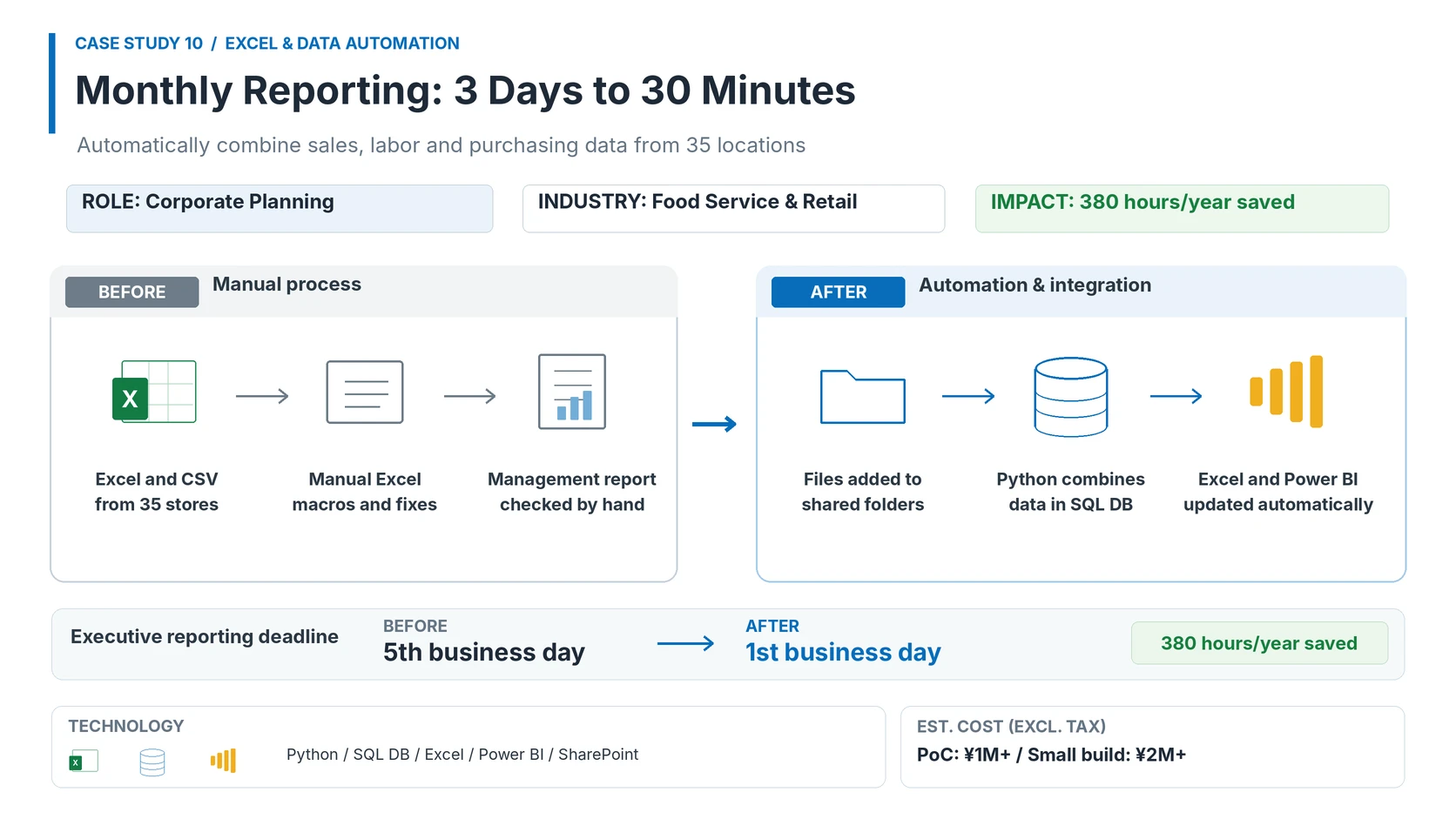
By building a pipeline that automatically takes in sales CSVs and attendance Excel files arriving in different formats from 35 stores nationwide, checks them for errors, consolidates them in a database and outputs them automatically to the Excel report for management meetings and a BI dashboard, the client cut consolidation work that took 3 days every month to 30 minutes. Development took 1.5 months. With an assumed team of 1 part-time PM and 1 engineer, main development took about 2 person-months; the reference price for an equivalent configuration is from ¥1 million for the paid PoC and from ¥2 million for a small-scale build (both excl. tax).
Before and after
| Item | Before (manual copy and paste, black-box VBA) | After (Seirai data integration and automatic output platform) | Impact |
|---|---|---|---|
| Effort to produce the monthly report | About 3 business days every month (32 hours in total for 2 corporate planning staff) | About 30 minutes (only checking the automated run and adding comments) | Consolidation effort cut by more than 95% |
| Timing of figures reported to management | 5th business day of the following month (action starts late) | Updated and distributed automatically on the morning of the 1st business day of the following month | Management decisions 4 business days faster |
| Consolidation errors and macro failures | VBA stopped every month when stores added columns or broke the formatting | Automatic validation flags only the defective files at once | Risk of person-dependent VBA maintenance removed |
| Comparison and analysis against past data | Files scattered by year and month made cross-comparison difficult | Stored automatically in a unified DB; year-on-year and store-by-store trends shown instantly | Faster profit-improvement action store by store |
Challenges before the project
From the 1st to the 3rd of every month, two corporate planning staff consolidated the sales, labor-cost and cost-of-goods Excel files and POS data sent in by the client's 35 stores to prepare the board papers, and they had hit a serious limit.
The "secret recipe" Excel macro left by a former employee broke every month
The company depended on a complex VBA macro written by someone who had left five years earlier; a store inserting one column or typing full-width digits was enough to stop it with an error, and finding the cause took half a day.
Data formats differed from system to system
The POS CSVs, the attendance system's Excel files and suppliers' invoice data each used different store codes and date formats, so staff repeated VLOOKUP and copy-and-paste by hand.
Too busy consolidating to analyze
The first three days of the month were consumed by data formatting alone, leaving no time to analyze why stores were loss-making or to work out a response to rising costs.
How we solved it: approach and architecture
We took an approach (a fabric01-type architecture) that renews only the behind-the-scenes data processing on a robust Python and database platform without adding to the stores' operational burden.
Automatic cleansing and input checks that run simply when files are dropped into a shared folder
When each store saves its files in the designated folder as usual, the pipeline automatically verifies character encoding, date formats, required fields and the consistency of store codes. If there is a defect, the store and row number concerned are notified to Teams automatically.
Automatic accumulation in a unified database and migration of past data
Three years of scattered monthly Excel files were also cleansed in bulk and migrated to a SQL database, making year-on-year comparison for the same month by store and by product category possible in one click.
Hybrid output of the Excel reports the directors know and Power BI
We kept the automatic filling of the Excel layout familiar from management meetings, and at the same time connected a Power BI dashboard where daily sales flash figures can be checked in a browser.
Workflow and system: before and after
Results after the project
Monthly consolidation cut from 3 days to 30 minutes (about 380 hours of work saved a year)
Corporate planning staff were freed from data formatting and could shift to analysis work such as improving the cost ratio and optimizing shifts.
Profit and loss for all 35 stores visible on the morning of the 1st business day of the following month
With figures finalized 4 business days earlier, unprofitable menu items can be reviewed and promotions launched within the month.
Voice from the field: “The days of dreading when the black-box macro would stop are over. And because it can also output in the Excel format the directors are used to, there was no resistance at all inside the company.” (General Manager, Corporate Planning Department)
System stack and environment
| Layer | Technology and configuration |
|---|---|
| Data collection and intake | SharePoint / shared-folder monitoring (POS CSVs, attendance Excel files, purchasing data) |
| Cleansing and conversion | Python (automatic validation, store-code matching, exception notifications) |
| Data storage and unified DB | PostgreSQL / SQL Server (integrated management of three years of past data) |
| Output and report generation | Automatic Excel generation in the existing format + Power BI integration |
| Alerts and operations monitoring | Microsoft Teams (import-complete notifications, automatic alerts on format errors) |
| Authentication and access control | Microsoft Entra ID (viewing controlled separately for directors, area managers and store managers) |




Product names and logos shown are trademarks or registered trademarks of their respective owners.
Frequently asked questions
QWe have no specification left for our existing Excel macros (VBA). Can they still be migrated?
Yes, that is not a problem. Seirai's engineers analyze the actual Excel files and VBA code directly, document the business logic, and then migrate it safely to an automation platform that does not throw errors.
QIf we add stores or business units in future, can it cope without modifying the system?
Yes. We design it to be extensible, so that adding a row to the store master or the account master on an admin sheet is all it takes to include it in the automatic consolidation.
QWe have not yet introduced a BI tool (Power BI or Looker Studio). Can we ask for Excel output only?
Of course. You can start small with automatic creation of your existing monthly Excel report (paid PoC from ¥1 million, small-scale build from ¥2 million; both excl. tax) and add a BI dashboard later in a phased introduction.


