





How did local AI-OCR cut the processing of 10,000 forms from 5 days to 1, and what did it cost?
By building local AI-OCR and an automated matching pipeline in an on-premises environment (a closed-network server) that sends no data whatsoever to an external cloud, the client cut the time needed to digitize 10,000 forms a month from 5 days to 1. A 2-week paid PoC on real data was followed by 1.5 months for the full build. With a team of 1 PM and 2 engineers, main development took about 4 person-months; the reference price for an equivalent configuration is from ¥1 million for the paid PoC and from ¥4 million for the full build (both excl. tax).
Before and after
| Item | Before (visual checks and manual entry) | After (Seirai local AI-OCR) | Impact |
|---|---|---|---|
| Processing time per 10,000 sheets | About 5 business days (shared among 3 staff) | About 1 business day (automated processing, with visual checks for exceptions only) | Lead time cut by 80% |
| Data sent to an external cloud | Considered, but not allowed under security rules | None at all (everything stays on the in-house closed-network server) | Risk of information leaks eliminated |
| Transcription and input error rate | About 3.2% (misread handwritten digits and part numbers) | Under 0.3% (automatic extraction with a confidence-score threshold) | Far less rework and re-checking |
| Development period and initial cost guide | — | 2-week PoC (from ¥1 million, excl. tax) + 1.5 months of main development | About half the period quoted by a major systems integrator |
Challenges before the project
The client checked the inspection reports and delivery notes arriving from suppliers and factory lines (about 10,000 sheets a month) and keyed them by hand into Excel and the production-control database. Three issues had become serious bottlenecks on the shop floor.
Security rules ruled out off-the-shelf cloud OCR
The forms contain suppliers' confidential specifications and unit prices, so SaaS OCR that sends PDFs to an external cloud API could not pass the IT department's review.
Every supplier used a different format
Alongside standard forms there were PDFs with handwritten additions and differing layouts, and conventional coordinate-based OCR reached a reading accuracy of only around 60%.
Overtime and checking stress in busy periods
At month-end and shipping peaks, three staff spent about five days doing nothing but visual checks and transcription, leaving no time for their real work of quality analysis.
How we solved it: approach and architecture
Rather than rebuilding a huge core system from scratch, we kept the existing Excel and database operations and replaced only what happens behind the scenes, from reading through verification to registration, with a closed-network AI pipeline.
A 2-week paid PoC on 50 real forms to verify accuracy in advance
Before main development, we received 50 of the handwriting-mixed PDFs actually used on site and ran recognition-accuracy tests in a local environment. Main development started only after confirming 98.4% field-extraction accuracy.
Local AI-OCR with zero external communication, plus automatic layout detection
On an in-house server (a GPU machine) we built an inference platform combining an open-weight vision-language model (VLM) with an OCR engine. It identifies the form type automatically and converts each field into structured JSON data.
A review screen that highlights only low-confidence cells instead of checking every sheet
Fields where the AI's confidence is 95% or higher pass automatically; only cells with low confidence, such as smudged handwriting, are highlighted in yellow on the web review screen. Staff now correct only the places where the AI was unsure.
Workflow and system: before and after
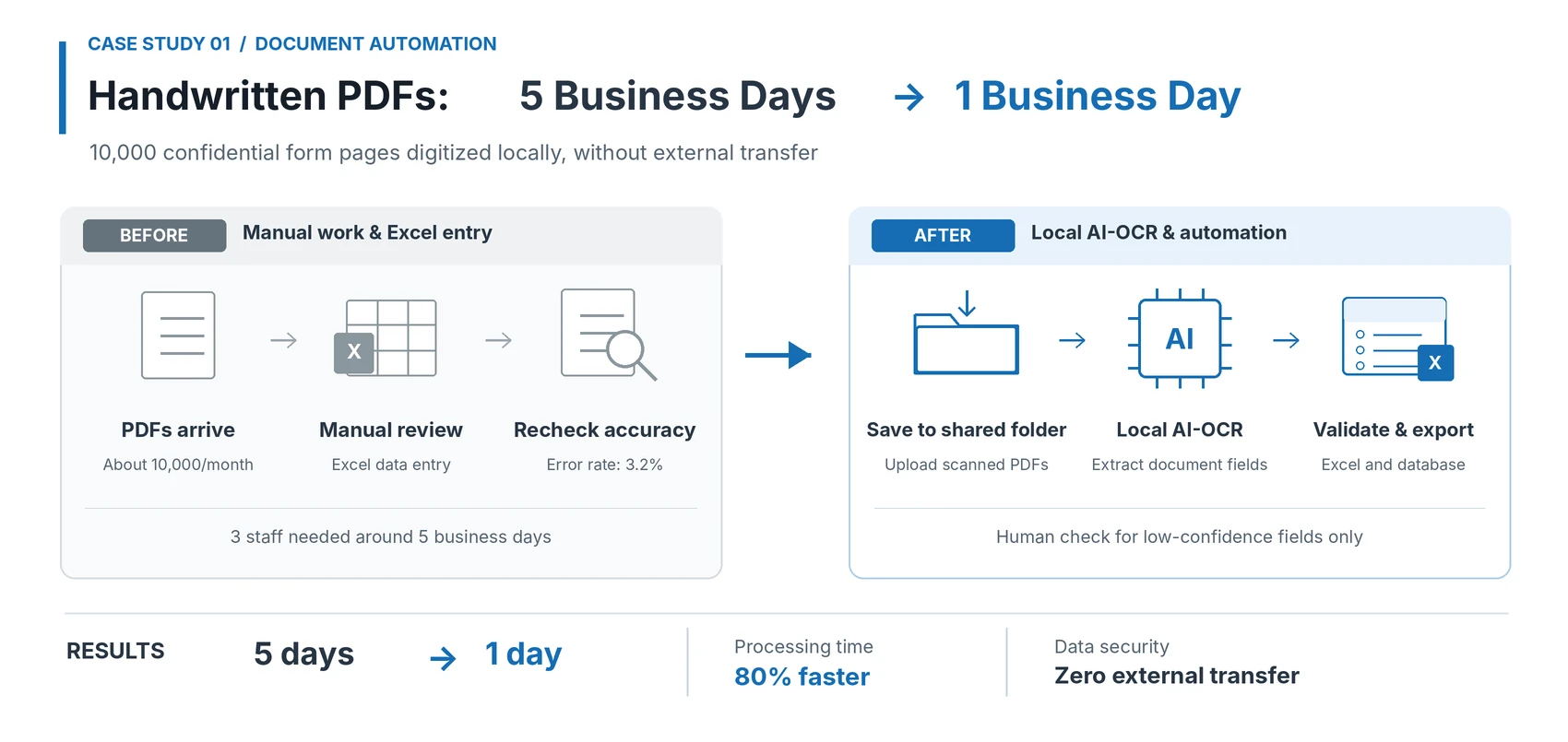
Results after the project
Processing time cut from 5 days to 1 (about 64 hours of work saved a month)
Simply saving the scanned PDFs to a dedicated folder triggers the nightly batch and real-time processing, and by the next morning the structured data is in Excel and PostgreSQL.
Passed the IT department's security audit at the first attempt
Because inference is completed inside a closed network fully cut off from the internet, the system went into production without any change to internal rules.
Less psychological strain on staff: “We were freed from following the figures on 10,000 sheets line by line, and can now concentrate on exception checks and our real work of quality control.” (Staff member, Quality Assurance Department)
System stack and environment
| Layer | Technology and configuration |
|---|---|
| Data input and intake | PDFs scanned on the multifunction printer / automatic shared-folder monitoring (Watchdog) |
| AI-OCR and structuring engine | Local VLM + high-accuracy Japanese OCR engine (fully offline inference) |
| Verification and review UI | Web review UI (automatic highlighting of low-confidence cells, one-click correction) |
| Data storage and DB | Automatic registration in a PostgreSQL database |
| Output and business use | Automatic Excel output in the existing format |
| Security and access control | Runs entirely on the in-house closed LAN (zero external API communication), integrated with Active Directory authentication |
Product names and logos shown are trademarks or registered trademarks of their respective owners.
Frequently asked questions
QCan it read handwriting and low-quality fax PDFs?
Yes. Before implementation, we run a 2-week paid PoC on samples of your actual forms (roughly 30–50 sheets) and report the recognition accuracy for each field in figures.
QWhat if we do not have a high-spec GPU server in-house?
We handle everything end to end, including building on a closed private cloud (AWS VPC or an Azure closed network) and advising on the selection and procurement of a compact on-premises inference server.
QIf we take on new suppliers and new form formats are added, do we have to ask the developer every time?
No. A template function lets you add and adjust the fields to extract from a new form (for example order number, quantity and delivery date) from the admin screen without code, so your own staff can extend the system.