


How was the processing of 800 invoices a month, including Excel entry, cut from 8 minutes to 2, and what did it cost?
By automating the whole chain end to end, from automatically collecting PDF invoices arriving by email (Outlook), through field extraction and automatic matching against the order-management Excel file, to CSV output for the accounting software, the client cut processing time per invoice by 75%, from 8 minutes to 2. Development took 1.5 months, and the format of the Excel ledger the team is used to was kept. With an assumed team of 1 part-time PM and 1–2 engineers, main development took about 2.5 person-months; the reference price for an equivalent configuration is from ¥1 million for the paid PoC and from ¥2.5 million for a small-scale build (both excl. tax).
Before and after
| Item | Before (manual download and transcription) | After (Seirai automated integration pipeline) | Impact |
|---|---|---|---|
| Processing time per invoice | About 8 minutes (save, check by eye, copy into Excel, create CSV) | About 2 minutes (check only the differences left after automatic matching) | Processing time cut by 75% (80 hours freed up a month) |
| Errors in amounts and payee details | Several input errors a month, plus the burden of checking for double payments | Reduced to zero by automatic calculation checks | Removes the psychological strain of the accounting close |
| Screens and workflow changes for staff | Uses the existing Excel management ledger | The existing Excel ledger is updated automatically as it is | Almost no learning cost for staff |
| Development period and initial cost guide | — | 1.5 months / paid PoC from ¥1 million + small-scale build from ¥2.5 million (excl. tax, reference price) | Payback period estimated case by case from volume and labor cost |
Challenges before the project
The client received about 800 invoices every month from about 150 suppliers, as email attachments (PDF) or web downloads, and its two accounting staff were tied up in the following manual work.
A huge volume of simple work from saving emails to copying into Excel
Each PDF was renamed and saved to a shared folder, and the supplier name, invoice date, qualified-invoice registration number and amounts by tax rate were keyed into the management Excel file one invoice at a time.
Checking against order data by eye took time
Staff compared invoice amounts with the order Excel file created by Sales using a calculator and their eyes, taking 8 minutes per invoice on average.
A large-scale accounting system replacement did not fit the budget or schedule
Packaged accounting DX tools were also considered, but they did not fit the current Excel ledger or the company's own departmental allocation rules, and the idea was dropped because customization would have been expensive.
How we solved it: approach and architecture
We built a lightweight, cost-effective integration platform on one principle: keep the Excel ledger the team knows well exactly as it is, and automate only the copying, pasting and checking that people had been doing.
Automatic collection of invoice PDFs from the Outlook inbox
Invoice emails arriving at the dedicated accounting address are detected automatically, and the attached PDFs are filed in the shared folder according to supplier-code and date rules.
Automatic extraction of invoice numbers and line items by tax rate, matched against the order Excel file
A program automatically compares the invoice amount extracted by AI-OCR with the amount in the Sales team's order-management Excel file. Exact matches are automatically given a "Matched" status, and only those with differences appear on the review list.
Automatic writing to the existing Excel file and one-click generation of the accounting import CSV
Pressing the confirm button both appends the entries to the existing accounting ledger in Excel and converts them into the CSV format for import into the accounting software.
Workflow and system: before and after
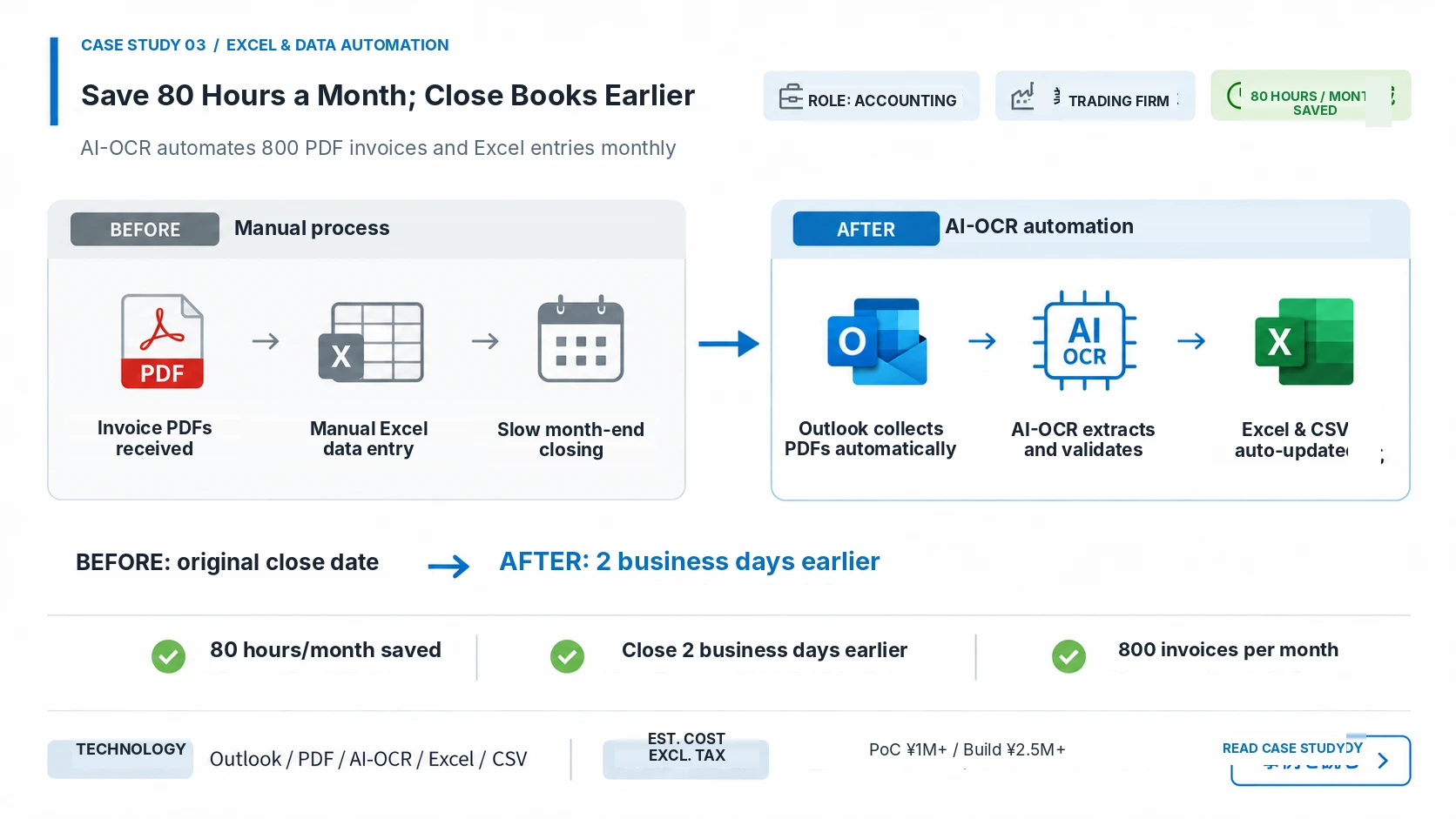
Results after the project
About 80 hours of overtime saved a month and an earlier monthly close
Invoice processing that used to pile up at month-end and month-start now takes 2 minutes per invoice, and the monthly closing date moved forward by 2 business days.
Validity checks on invoice registration numbers automated as well
With automatic checks against the National Tax Agency API built in, missing or mistyped registration numbers are now detected automatically.
Costs optimized through outright purchase
Without adding temporary staff or signing up for expensive monthly SaaS licenses, the client optimized costs by owning the system outright as a company asset.
System stack and environment
| Layer | Technology and configuration |
|---|---|
| Data collection and trigger | Microsoft Outlook (automatic detection and saving of PDF email attachments) |
| Extraction and matching | Python batch + high-accuracy form AI-OCR (supports qualified invoices and tax-rate line items) |
| Review and approval UI | Browser review screen (alerts on differences from order amounts, PDF shown side by side) |
| Ledger update and output | Automatic writing to the existing Excel format + CSV output for the accounting system |
| External API check | Automatic verification via the National Tax Agency API for the public register of qualified invoice issuers |
| Operations and maintenance | Automatic Teams notification on errors, automatic daily backup |


Product names and logos shown are trademarks or registered trademarks of their respective owners.
Frequently asked questions
QCan it read invoices even when every supplier uses a completely different layout?
Yes. Instead of conventional coordinate-based OCR, we use AI-OCR that recognizes fields such as the invoice amount, payee bank details and registration number from context, so there is no need to register a template for each supplier in advance.
QCan the output match the CSV format of the accounting software or sales management system we use now?
Yes. We customize the output format to the import specification (CSV layout) of the accounting software you currently use.
QCan we start small with some of our suppliers (around 100 invoices a month)?
Yes. In a 2-week paid PoC (from ¥1 million, excl. tax) you can review an extraction and matching demo on your actual invoice PDFs, and then widen the scope step by step.