

How were minutes and task registration for Teams meetings cut from 2 hours to 15 minutes, and what did it cost?
Triggered by the end of a Microsoft Teams meeting, AI applying the firm's own dictionary of industry terms automatically generates decisions, next actions (owner and due date) and discussion points in a fixed format, with saving to SharePoint and task registration automated as well; this cut the time to produce minutes from 2 hours to 15 minutes. Development took 3 weeks. With an assumed team of 1 PM and 1 engineer, the work took about 1.5 person-months; the reference price for an equivalent configuration is from ¥1.5 million for a small-scale build (excl. tax, limited scope).
Before and after
| Item | Before (reviewing recordings and transcribing by hand) | After (Seirai automated minutes and to-do integration) | Impact |
|---|---|---|---|
| Time to produce minutes per meeting | About 2 hours (re-listening to the recording + formatting in Word + checking) | About 15 minutes (checking only the specialist wording in the AI draft) | Effort cut by 87% |
| Speed of sharing with the client | 2–3 days after the meeting (sent once memories have faded) | Draft completed automatically within 30 minutes of the meeting ending | Higher client satisfaction and project momentum |
| Mis-transcribed technical terms and client-specific names | Full of errors with off-the-shelf transcription tools | Converted accurately using a dictionary of client names and technical terms | No more stress from manual corrections |
| Missed next actions | Buried in the minutes; found untouched at the next regular meeting | Raised automatically in Teams/Planner with an owner and due date | Higher task completion and on-time delivery rates |
Challenges before the project
At the client, where consultants run many regular client meetings in parallel every week, writing minutes and managing tasks had become a major cause of overtime for junior and mid-level staff.
Two hours of minutes for a one-hour meeting
With technical terms and client-specific project names flying around, off-the-shelf general-purpose transcription tools made many errors, and staff ended up re-listening to the recording at double speed while rewriting it in Word.
Inconsistent formats made it hard to follow what was decided
Everyone wrote differently, and who was to do what by when (the action items) was buried in the text, so tasks were missed.
Client confidential information could not be entered into cheap external transcription SaaS
Under non-disclosure agreements (NDAs), recordings and transcripts had to be processed in an environment under the firm's own control where they would not be used for AI training.
How we solved it: approach and architecture
Rather than adding another external tool with monthly fees, we built in 3 weeks a pipeline that works with the client's Microsoft 365 environment and generates minutes and tasks automatically in the firm's own format.
A fully automatic trigger that detects the end of a Teams meeting
When the meeting transcript (caption data) is generated, Power Automate starts automatically, so nobody has to upload a file.
Project-specific dictionaries of proper nouns and technical terms, with output in the firm's standard template
A prompt design that consults client names, product abbreviations and staff names in advance corrects transcription errors, and the minutes are saved to SharePoint automatically in the firm's specified format of (1) decisions, (2) issues and discussion points, and (3) to-dos (owner and due date).
Next actions turned into tasks automatically, with Teams notifications
The extracted to-dos are registered automatically in Microsoft Planner, and the people concerned are notified in their Teams channel with a link to the minutes.
Workflow and system: before and after
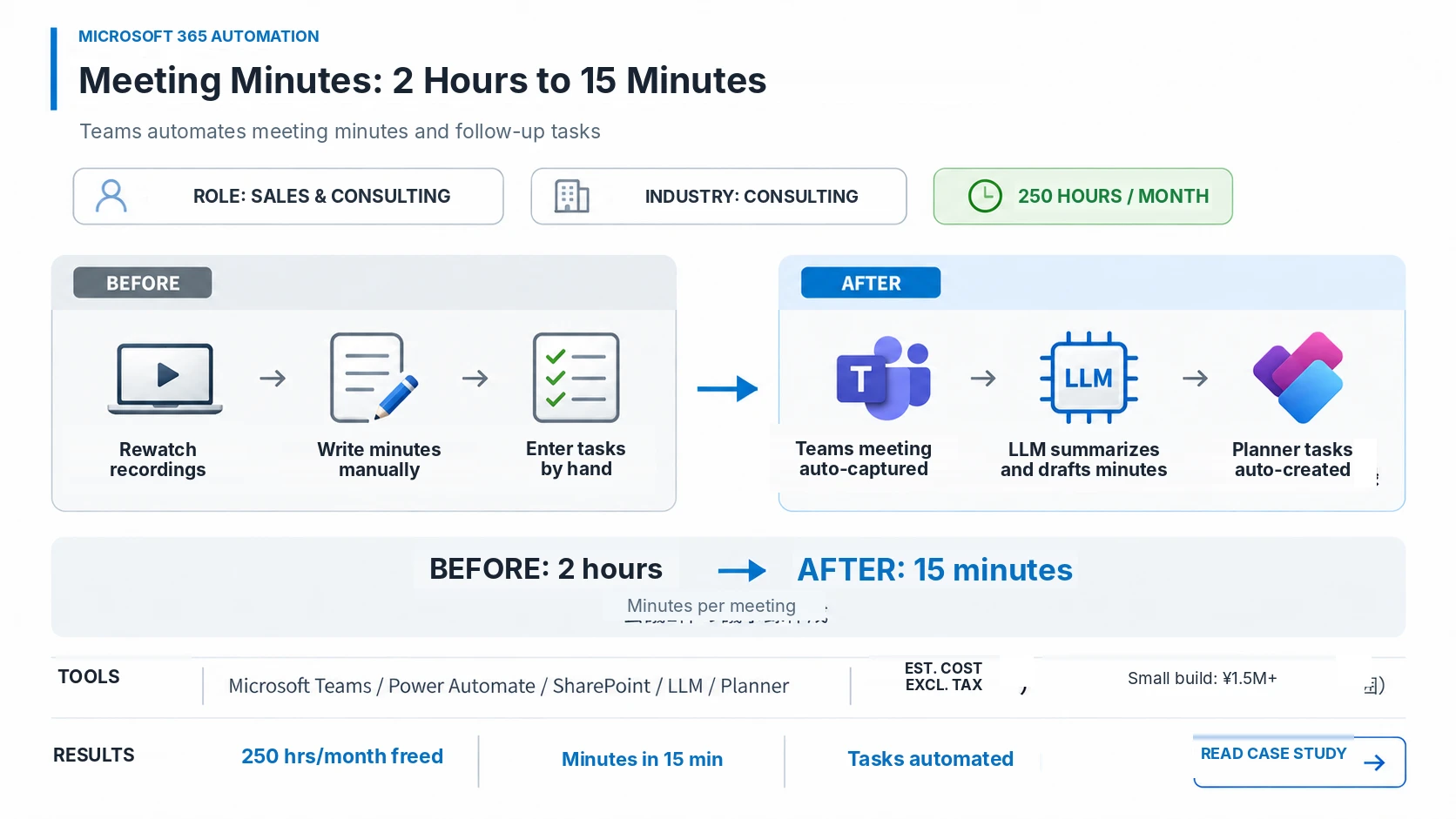
Results after the project
Time to produce minutes cut from 2 hours to 15 minutes (about 250 hours freed up a month across the firm)
A high-quality draft of the minutes is ready 30 minutes after a meeting ends, so consultants can share it with the client the same day.
Far fewer missed next actions
Action items decided in the meeting go into the task list automatically, so disputes at the next regular meeting over what was or was not said have disappeared.
Voice from the field: “With off-the-shelf tools we ended up rewriting everything, but this comes out in our own format and terminology, so after a 15-minute review it is at a level we can send to the client.” (Senior Consultant)
System stack and environment
| Layer | Technology and configuration |
|---|---|
| Meeting and transcript capture | Microsoft Teams (automatic transcript retrieval) |
| Automated pipeline | Microsoft Power Automate |
| AI summarization and term-correction engine | Closed-network LLM API (no data training; linked to a custom glossary) |
| Document storage and sharing | Microsoft SharePoint (filed automatically into project folders) |
| Task and notification integration | Microsoft Planner + automatic posts to Teams channels |
| Security and authentication | Microsoft Entra ID (company accounts, access permissions inherited) |

Product names and logos shown are trademarks or registered trademarks of their respective owners.
Frequently asked questions
QCan it also handle recordings and transcripts from Zoom or Google Meet meetings?
Yes. A configuration that connects to the Zoom or Google Meet recording and transcript APIs and outputs automatically to Google Drive or Slack can be built in the same period and at the same cost.
QCan the output match the Word or Excel minutes format our company has decided on?
Yes. Filling the specified places in the Word (.docx) or Excel template you use now automatically can be implemented as standard.
QCan it be used with audio recordings (MP3/WAV) of in-person meetings where several people speak at once?
Yes. We can add a batch that handles speaker separation, transcription and summarization automatically when an audio file is simply placed in a designated folder.