



How did local AI-OCR digitize large volumes of trade-show business cards the same day without sending them to an external cloud, and what did it cost?
By building local AI-OCR and an automatic record-matching pipeline that run on in-house PCs and a closed-network server, the client digitized the thousands of business cards collected at a trade show within the same day without sending anything to an external cloud, and moved the start of sales follow-up from a week later to the same day. Development took 1 month. With an assumed team of 1 part-time PM and 1 engineer, the work took about 2 person-months; the reference price for an equivalent configuration bought outright is from ¥2 million including the PoC (excl. tax, limited scope), a configuration that needs no pay-as-you-go fees for business card management SaaS.
Before and after
| Item | Before (outsourced data entry and manual input) | After (Seirai local business card AI-OCR) | Impact |
|---|---|---|---|
| From digitization to sending thank-you emails | About 5–7 business days after the trade show ends | Same evening to next morning (CSV created automatically minutes after scanning) | Much higher rate of conversion to sales meetings |
| Personal data taken or sent outside the company | Concern over entrusting data to external cloud SaaS or data-entry services | Completed in the in-house local environment (zero external API transmission) | Clears personal data protection and IT review |
| Digitization cost per card | Several hundred thousand yen a year in outsourced data entry and pay-as-you-go SaaS fees | Built and bought outright, so no additional cost as the number of cards grows | Payback period estimated case by case from card volume and operating conditions |
| Survey notes and handwriting | Printed cards only; notes on the back keyed in separately by hand | The front of the card and the meeting notes on the back converted to text together | Automatic extraction of hot leads for sales |
Challenges before the project
Four times a year the client exhibited at major trade shows at venues such as Tokyo Big Sight, collecting 2,000–3,000 business cards each time, but a great deal was being lost in turning them into leads after the show.
By the time thank-you emails went out, the customer's interest had cooled
Cards were posted to an external data-entry contractor, so building the list took 5–7 business days and competitors got in first.
Security rules ruled out business card management SaaS routed through overseas servers
Many of the client's customers are major defense and infrastructure companies, and internal rules prohibited uploading customers' personal data or the meeting notes on the backs of cards to an external cloud.
Pay-as-you-go fees for every trade show, and the work of removing duplicates (record matching)
Cards were registered as duplicates of customer data already in the existing SFA (Salesforce, kintone and so on), and Sales Planning removed the duplicates by hand in Excel.
How we solved it: approach and architecture
In 1 month we built a tool that monitors a folder of card images batch-scanned on an off-the-shelf high-speed document scanner and completes everything up to the SFA import data within the in-house local environment alone.
Fully offline local AI-OCR for mixed Japanese and English
Vertical and horizontal text, cards with logos and cards with an English reverse side are identified automatically, and company name, department, job title, name, email, phone number and address are structured with close to 99% accuracy. Notes handwritten by salespeople on the back of a card, such as "quote needed" or "A rank", are extracted at the same time.
Automatic matching against the existing customer master and correction of notation variants
Variants of the Japanese company-type designation (the full form and its abbreviation) and full-width versus half-width characters are unified automatically, and each record is linked automatically to the account ID in the existing SFA.
A review screen with confidence alerts, plus batch output of the SFA import CSV
Only the characters read with low confidence are listed on screen and can be corrected in a few minutes, and a CSV ready for import into MA/SFA is output in one click.
Workflow and system: before and after
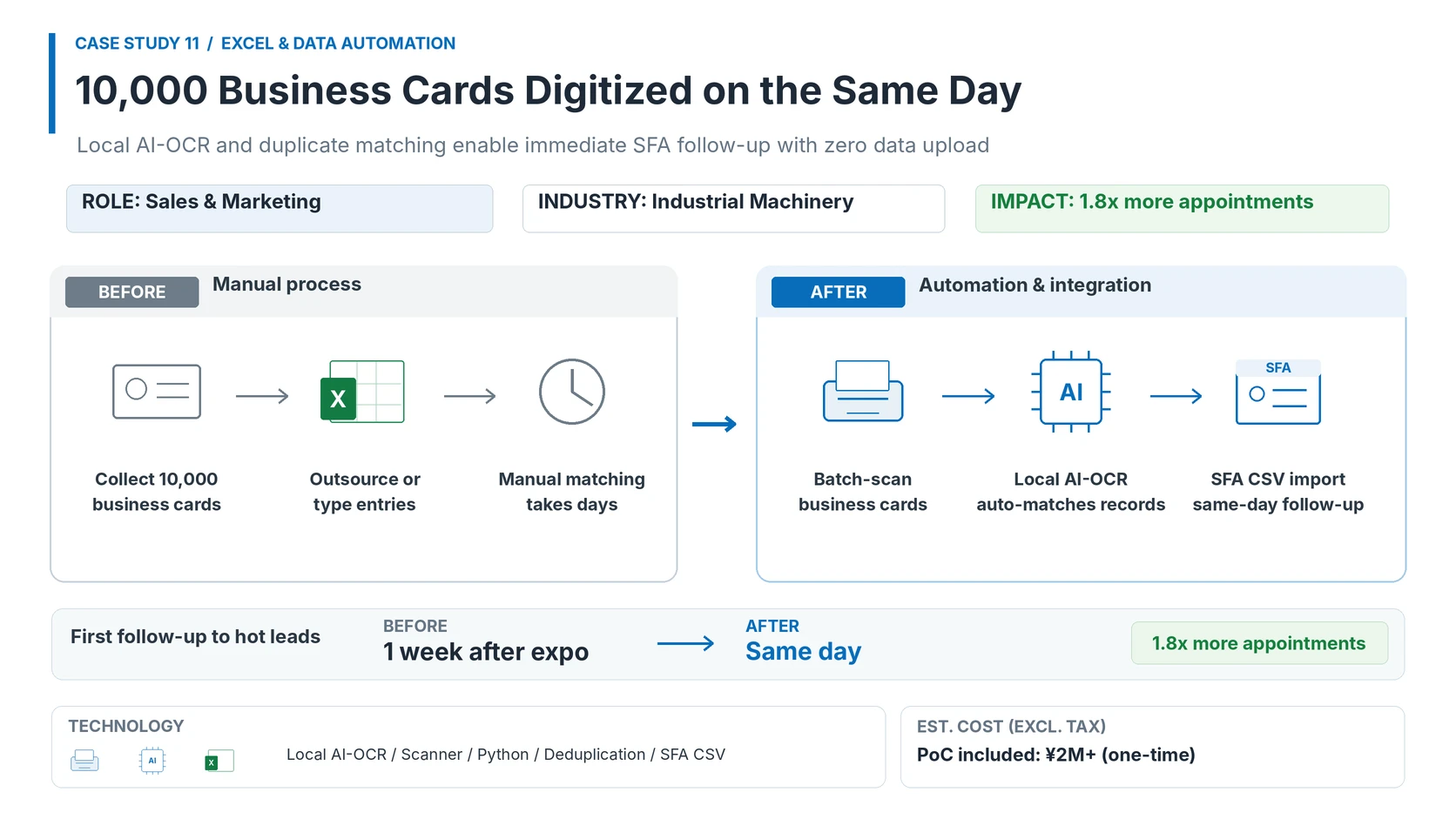
Results after the project
Thank-you emails and materials sent by the evening of the trade-show day
The first approach to hot leads was cut from 1 week to the same day, and the number of sales appointments won through trade shows rose to 1.8 times the previous level.
Costs reduced while meeting internal personal data protection rules 100%
Annual account fees for business card management SaaS and data-entry fees are no longer needed, and with four trade shows a year the system paid for itself from the first year.
Voice from the field: “Even a note scribbled on the back of a card, like 'budget available next month', goes into Excel along with it, so we can now phone the high-priority customers first thing the next morning.” (Section Manager, Sales Planning Department)
System stack and environment
| Layer | Technology and configuration |
|---|---|
| Scan input | High-speed document scanner (folder integration for batch double-sided scan images) |
| Local AI-OCR platform | VLM + Japanese and English OCR engine running entirely on in-house PCs/servers |
| Data shaping and record matching | Python (normalization of company-type designations, addresses and phone numbers + matching against the existing master) |
| Review and correction UI | Local web review screen (low-confidence cells highlighted, batch correction) |
| Output and destinations | Import CSV output for Salesforce / kintone / HubSpot / Excel |
| Security specification | Fully offline operation (zero external internet communication) |



Product names and logos shown are trademarks or registered trademarks of their respective owners.
Frequently asked questions
QCan it read English business cards with unusual designs, or Japanese cards with vertical text?
Yes. We use a local AI-OCR model that does not depend on layout, so it recognizes vertical text, horizontal text, cards with Japanese on one side and English on the other, and handwritten notes with high accuracy.
QWe have no dedicated server in-house. Will it run on an ordinary laptop or desktop PC?
Yes. We can propose a configuration that runs smoothly on a single compact GPU workstation (in the ¥200,000–¥300,000 range) or on a closed private cloud.
QBesides business cards, can the same tool read trade-show questionnaire sheets?
Yes. Extraction of check boxes and handwritten comments from trade-show questionnaire sheets can be added to the same local OCR platform as an additional template.