


What kind of system integration cut the approval lead time for quotes, approval requests and purchase orders from 7 days to 2?
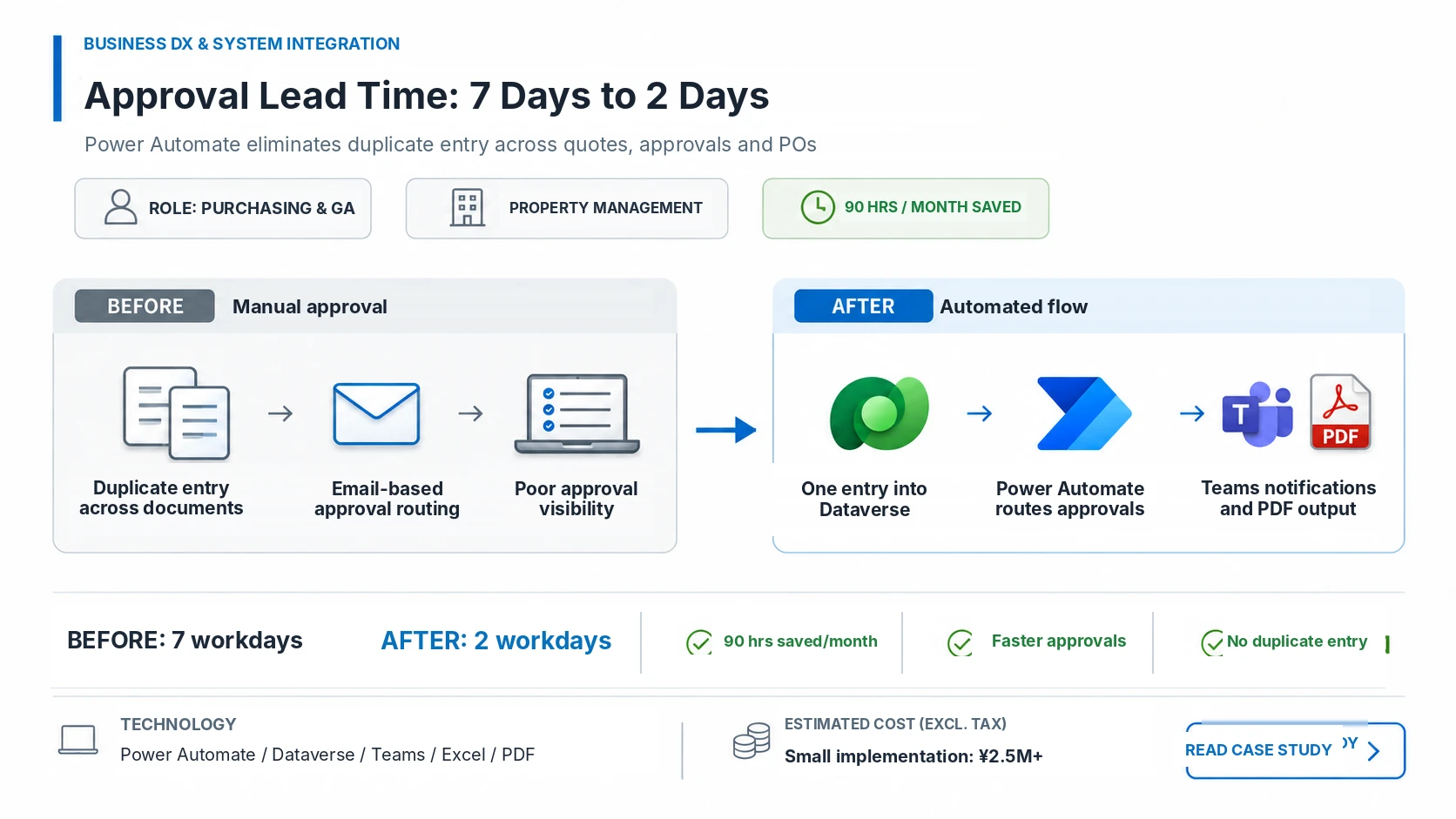
By bringing quote spreadsheets in Excel, approval requests circulated by email and purchase-order creation, which had all been run separately, together on Microsoft 365 (Dataverse, Power Automate and Teams), the client cut the average approval lead time from 7 business days to 2 business days and eliminated double entry completely. Development took 2.5 months. With an assumed team of 1 part-time PM and 1 engineer, the work took about 2.5 person-months; the reference price for an equivalent configuration using existing Microsoft 365 licenses is from ¥2.5 million for a small-scale build (excl. tax).
Before and after
| Item | Before (Excel, email and paper circulation) | After (Seirai M365 integration platform) | Impact |
|---|---|---|---|
| Lead time from approval request to purchase-order approval | 7 business days on average (approvers away, requests buried in email) | 2 business days on average (approved on a smartphone from a Teams notification) | Approval 71% faster |
| Number of times the same case data is entered | 3–4 times (quote Excel file, approval request, purchase order, payment ledger) | Once only (data from the first entry is carried forward automatically) | Double entry and transcription errors reduced to zero |
| Visibility of progress | Checked one by one with the person in charge by phone or email | A dashboard shows at once whose approval is pending | No more chasing and checking |
| License and running costs | A new large-scale ERP would mean high annual license fees | Running costs minimized by using the existing Microsoft 365 platform | TCO (total cost of ownership) greatly reduced |
Challenges before the project
The client handled facility management and outsourcing orders for more than 40 sites, but its business process was fragmented as follows.
The same data was copied again and again across quotes, approval requests, purchase orders and payments
After building a quote comparison sheet in Excel, staff copied the amounts into a separate approval request in Word or Excel and circulated it by email, then keyed them in again on the purchase order after approval, so transcription errors and returned requests were frequent.
Approval status was invisible and urgent orders were delayed
Because approval requests were circulated by email, nobody could tell which manager a request was currently stuck with, and approval took 7 business days on average.
Custom development of a large ERP did not justify the cost
A major systems integrator quoted more than ¥15 million and said requirements definition alone would take six months, so the client was looking for a realistic development partner that could keep pace with the front line.
How we solved it: approach and architecture
Using the Microsoft 365 environment the client had already rolled out company-wide as the foundation, we implemented centralized data management and automated approvals in 2.5 months.
Case and supplier master data centralized in Dataverse
The case information, supplier and amount data entered with the quote request are gathered in Dataverse. After approval, the purchase-order PDF is generated automatically in one click and the data carries straight through to Accounting's payment schedule.
Automatic approval routing by amount, with Teams notifications
The approval route is decided automatically from the order amount (under ¥300,000, under ¥1 million, or ¥1 million and over), and an approval card is sent immediately to the approver's Microsoft Teams. Managers who are out of the office can approve from a smartphone in 10 seconds.
Requirements definition and hands-on support from a bilingual PM
We settled the priority of requirements among three parties, the on-site facility managers, Accounting and IT, in 2 weeks, and refined the screens in an agile way while people tried out a prototype.
Workflow and system: before and after
Results after the project
Approval lead time cut from 7 days to 2, with dramatically faster ordering of urgent repairs
Immediate approval from Teams notifications and automated reminders reduced stalled requests to almost zero.
About 90 hours of clerical work saved a month by ending double entry
With data connected in a single line from quote to payment request, transcription work and checks on returned requests disappeared.
Personnel and organizational changes handled by the IT department alone
The approval-authority master was designed to be changed easily on screen, so even the reorganization at the start of the fiscal year is handled with no additional modification fees to a vendor.
System stack and environment
| Layer | Technology and configuration |
|---|---|
| Front-end request and admin screens | Power Apps / custom web screens (PC and smartphone) |
| Workflow and approval notifications | Microsoft Power Automate + Microsoft Teams Adaptive Cards |
| Database and master data management | Microsoft Dataverse (central management of case, supplier and approval-authority masters) |
| Document output and storage | Automatic generation of purchase-order PDFs + automatic archiving in SharePoint |
| External integration and accounting output | Automatic payment-schedule CSV for import into the existing accounting system |
| Authentication and security | Microsoft Entra ID (SSO login with existing company accounts) |


Product names and logos shown are trademarks or registered trademarks of their respective owners.
Frequently asked questions
QCan data be exchanged with our existing core system or accounting software by CSV or API?
Yes. Approved data can be output automatically in a CSV format your existing accounting software or sales management system can import, or via API.
QCan front-line employees use it even if they are not IT-savvy?
The design is simple, just pressing a button from the Teams notifications they already use every day, so it was adopted smoothly at every site simply by handing out a manual.
QCan we also ask for maintenance and new features after development is complete?
Yes. In addition to one month of adoption support after go-live, we flexibly support later feature extensions and rollout to other departments on a one-off basis or through a monthly support plan.